More time coaching.
Less time catching up.
Know each client’s history, make the next program change, and keep follow-ups moving. One workspace for your coaching and the business you run between sessions.
Free for your first 5 clients. No card required.
Monday / Your clients
Know who needs you.
Alex
Full body A is ready to train.
Jordan
Weekly check-in ready to review.
Sam
Next session: Wednesday, 9:00 am.
The whole coaching loop
From “here’s your plan”
to “here’s what’s next.”
A program is the start. AirFit brings the completed sets, client notes, and weekly check-ins back to you, so you can coach from what actually happened.
Prepare their week
Build with reusable exercise blocks. Preview bulk changes, see which clients an edit reaches, and restore an earlier version when needed.
Program changes keep completed workout logs.
Give them a clear next step
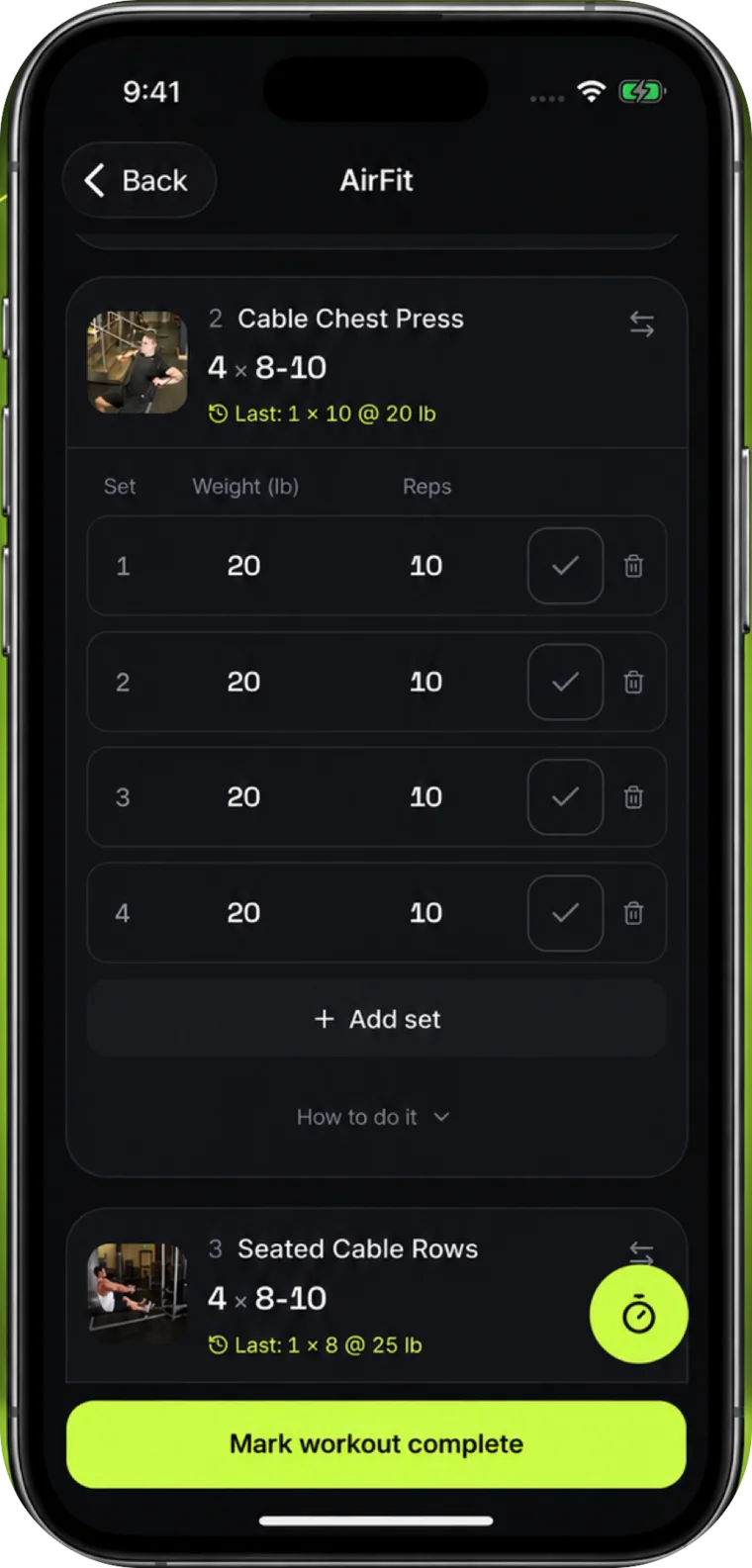
Clients open their workout on their phone, choose from alternatives you allow, and see the exercise notes you share with them.
Their plan, your guidance, and the sets they log.
Make the next session count
Review workouts, check-ins, comments, and program changes in a client timeline. Open the original record before you decide what comes next.
The client’s history beside your coaching work.
Your public page
A page that works for you
between sessions.
Every trainer gets a public page at airfit.ai/p/your-handle. Put the link in your Instagram bio. A visitor reads about you, books a consultation, or sends an enquiry that lands in your pipeline.
- Your photo, tagline, about text, city, hours, phone, website, and Instagram.
- A Book a consultation button when you allow self-booking. An enquiry form always.
- Every enquiry becomes a lead, with the source recorded as your public page.
- Listed in the AirFit trainer directory and open to search engines once you publish.
- Unpublish at any time. The page then returns not found.
Lead management
Every enquiry
gets a next step.
Enquiries from your public page land on a pipeline board. Each lead carries a stage, a source, a follow-up date, and a record of what you did.
- Six stages, from New to Client. Move a lead in one tap, on your phone.
- Due and overdue follow-ups in one worklist. Snooze a lead, or win back a former client.
- Record each consultation: attended, no-show, rescheduled, or canceled.
- Edit and copy a reply draft, send it through your own channel, then log the contact.
- Import leads from a CSV file with a preview. Undo the import if it was wrong.
Business analytics
Your business,
in numbers you can trust.
The Business page turns what you already record into charts: payments become revenue and churn, sessions become utilization, workouts become adherence, and leads become a funnel. No spreadsheet.
- Recurring revenue and paying clients. This month is exact, and the trend says where it is reconstructed.
- Starts and cancellations by month, with churn as a rate you can act on.
- What sells, with recurring plans and one-off packs kept apart.
- How clients train, as a distribution of adherence rather than one average.
- Where leads go, from enquiry to client. Export every record as CSV on every plan.
More context for your next coaching decision.
Our latest coaching tools bring the review, the evidence, and the next action together. Pilot access is separate from your plan; upgrading does not enable these features.
Review, edit, then approve
A daily inbox groups work by client. Save a check-in reply draft, inspect the records behind its summary, and approve your feedback. Snooze work you want to return to, on web or mobile.
Notice a change in training
See when logged training drops below a client's usual activity, with the dates and counts behind the signal. You decide whether to follow up or pause monitoring.
Keep failed payments in view
On the web, see unpaid client invoices, retry dates, and payment outcomes. Send a reminder when needed. Clients can open a payment page to pay or update their card.
Your clients get a real app.
You get the data back.
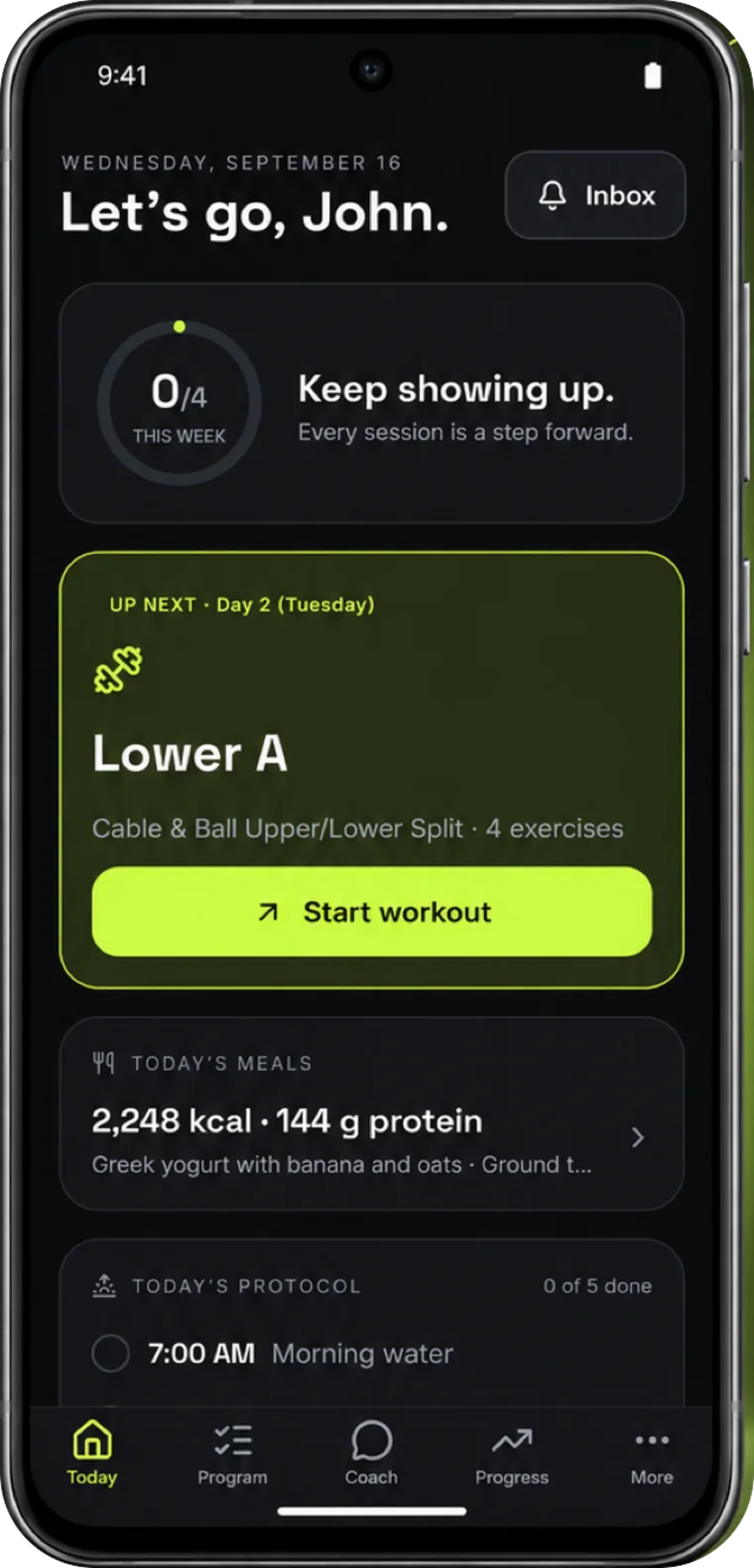
AirFit for iOS and Android puts today's workout, set logging and check-ins on your client's phone. Their entries appear in your coaching workspace, with the same account and history on the web.
- Workouts with your allowed alternatives and shared exercise notes
- Review client history, onboarding, and lead follow-ups from your phone
- Meal plans and a food diary beside the program you wrote
Free for every client on every plan. No app of your own to build or maintain.
A business with room to grow
What would a few hours back change?
More room for a new client. More attention for the ones you have. Or a Sunday evening with your laptop closed. Put your own numbers into the estimate.
Your numbers, your estimate
3hrs
potentially back each week
15 clients × 12 minutes saved per client.
Illustrative estimate, not a measured customer result. The defaults assume 20 minutes of weekly admin per client today and 8 minutes with AirFit. Adjust both to reflect your workflow. Actual results will vary.
Your business, connected
The details belong
with the client.
Keep the tools you need for the week close to the person you are coaching.
See plans and limitsPrograms that grow with clients
870+ exercises, shared blocks, allowed alternatives, and change history. Preview exercise replacements across programs before applying them.
Follow-ups with a next step
See overdue and upcoming lead follow-ups. Record consultations and contacts, then edit and copy a reply draft to send through your own channel.
A clear start for every client
Track the invitation, intake, program, and first workout. The onboarding checklist updates from completed work, so you can see what is still needed.
Your business, in view and portable
See your weekly clients, leads, sessions, and revenue summary. Download business records as CSV files from Settings, on every plan.
A simpler schedule
Availability, client booking, session packages, and automatic session reminders.
Meal plans in the same app
Nutrition profiles, editable meal plans, macros, and a client grocery list.
Before you start
A few practical questions.
Who is AirFit built for?
Independent, online, and hybrid trainers who want programs, client history, onboarding, and business follow-up in one workspace. Start with your first client or bring an established roster. Gyms also get shared libraries and an owner summary across their team.
Do I need to move every client at once?
Start with one client and one program. Import programs and leads from supported CSV files on the web, check the preview, then choose what to bring over. Programs arrive as unassigned drafts. Import history shows what changed, and undo removes or restores records that have not been used or edited since the import.
What do my clients need to install?
No installation is required to start: clients can open their invitation in a browser. AirFit also has native iOS and Android apps for programs, set logging, check-ins and upcoming sessions, using the same account. See the store badges below for release availability.
Does AI make decisions for my clients?
You stay responsible for their coaching. AI can help draft programs and meal plans. You review and edit drafts before you assign or publish them.
Which new tools need early access?
The daily coaching inbox with saved review drafts, personal activity signals, and payment recovery screens are available to selected pilot accounts. Access is separate from your subscription. Program history, reusable exercise blocks, client onboarding, lead follow-up, business summaries, and CSV business exports are available without pilot access.
What does the free plan include?
Coach up to 5 clients with programs, workout logging, check-ins, scheduling, and meal planning. Free includes 10 AI drafts per month. New trainer accounts get 30 days of Pro without a card, then continue on Free unless you upgrade.
Are the example clients and time savings real?
The interactive walkthrough uses fictional clients to demonstrate the workflow. The time calculator uses editable assumptions, not customer research. It helps you estimate what a simpler coaching week could be worth to you.
Start small. Make it useful.
One client. One program.
Your first better coaching week.
Free for 5 clients, with 30 days of Pro to start. When your roster grows, Pro is $29/month for up to 25 clients.
No card. No client app fee.
Running a team? Explore AirFit for gyms. Training on your own? Meet AirFit Coach.